Path 2 · Accelerate
Intermediate to Advanced
Live sessions included

Digital Career Accelerator

Employers want more than the basics. Let’s get you proficient.

You already know the basics. The Accelerator builds on them, step by step, with Word and Excel from intermediate to advanced, PowerPoint and Outlook, plus once-a-month live group sessions with Kristin and expert guests. It’s Path 2 of our Computer Challenged to Career Confident (CC2CC) program.

What you’ll learn

Word and Excel, intermediate to advanced
PowerPoint
Outlook
Microsoft Teams
AI and ChatGPT
Career planning with AI
Mindset and soft skills
and more!

700+ students supported

Microsoft 365 Certified Instructor

Lifetime access

Total value $3,529You save $2,532

You pay$997

one-time payment

See what’s included →

Every lesson and Bonus Vault course unlocks the moment you enroll. 14-day money-back guarantee. Pay by credit card at our secure checkout.

Intermediate to Advanced

Word, Excel, PowerPoint and Outlook

Monthly

Live group sessions with Kristin, all recorded

Certificate

of Completion, after the final exam

700+

Students supported

Sound familiar?

You’ve got the basics. You’re ready for more.

Formulas, long documents, advanced formatting and a well-organized inbox are where the Accelerator picks up. It’s built for professionals ready to move from everyday skills to real workplace capability.

Structured, step-by-step training that helps you work faster and more accurately.

Here’s the good news

Advanced skills are learned, one step at a time.

Every lesson is a hands-on demonstration, and every module ends with a graded self-assessment, so you understand what you’re doing, and why. With once-a-month live group sessions, you can bring your questions straight to Kristin and expert guests.

Show up to work ready for whatever lands on your desk.

How it works

Watch us, do it with us, then do it on your own.
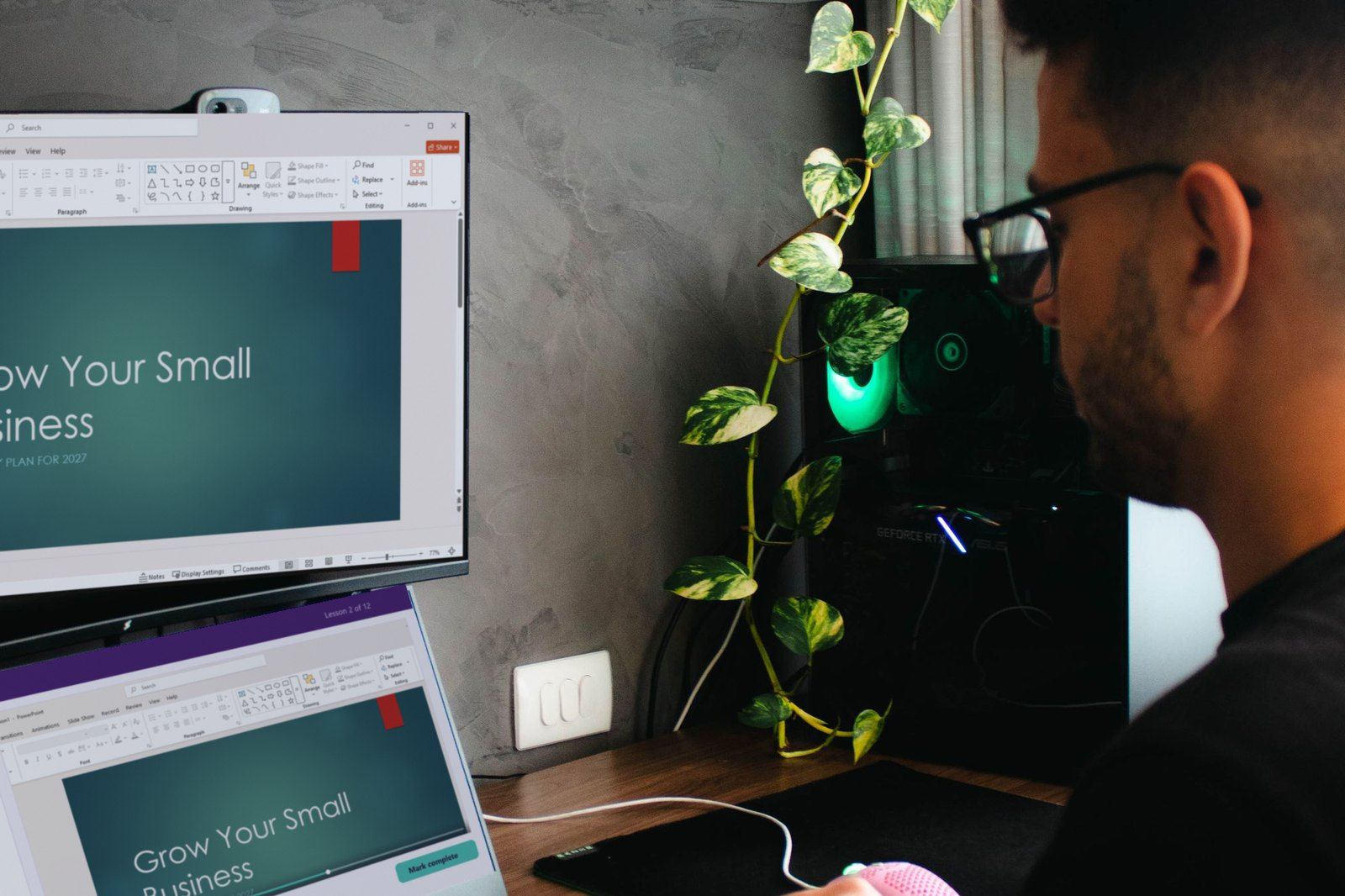
Every lesson works the same way: you watch on one monitor while you work on the other, right alongside the trainer. Hands-on! Practice files included.
A student builds a PowerPoint presentation on two monitors at home

1

Watch the lesson

Video lessons across five courses you can conquer on your own time, at your own pace.

2

Work alongside us

You’ll have access to download all the practice files we work on in class, so you can work on them together with us. Dual monitors are recommended, and you’ll also get a cheat sheet of takeaways at the end of every module!

3

Check yourself

Take the graded self-assessment at the end of each module, so you know you’ve grasped the concepts before you move on.

4

Prove it

Pass with 80% or better to earn our official Certificate of Completion to showcase on your social media, resume and LinkedIn profile.

Plus once-a-month live group sessions with Kristin and expert guests. Every one is recorded, so you have 24/7 access to the recordings. It’s the next best thing to being there!

What’s included

Intermediate to advanced, in one program

Five guided courses, a final exam and a Bonus Vault, plus once-a-month live group sessions with Kristin and expert guests.
1

Mindset Mastery and Soft Skills

Build a confident mindset and the soft skills employers look for, so you start strong.
$197 value
2

Microsoft Word, Intermediate to Advanced

Newsletters, sections and styles, fillable forms and macros, then Mail Merge, tables of contents, Track Changes and citations.
$250 value
3

Microsoft Excel, Intermediate to Advanced

Functions and formulas, charts, conditional formatting, PMT and ROUND, loan amortization, IF statements, named ranges and VLOOKUP.
$300 value
4

Microsoft PowerPoint

Layouts and design, photos, audio and video, animations and transitions, QR codes and printing.
$297 value
5

Microsoft Outlook

Inbox organization, rules and templates, contacts, tasks, notes and calendar sharing.
$247 value
6

Final Exam and Certificate of Completion

Pass the final exam with 80% or better to earn our official Certificate of Completion to showcase on your social media, resume and LinkedIn profile.
Included

Bonus Vault, unlocked on day one

Microsoft Teams: chat, meet and share files with confidence.
AI & ChatGPT Masterclass: use AI tools at work, explained in plain language.
Career Planning With AI: use AI to build your own career roadmap, résumé and LinkedIn profile, with a video walkthrough and step-by-step guides.
$247 value
$97 value
$997 value
Plus once-a-month live group sessions with Kristin and expert guests, for 12 months, a $997/month value. Each session is a live Q&A, a hands-on skill training or a career-focused session, and every one is recorded, so you have 24/7 access to the recordings. It’s the next best thing to being there!

Plus

  • Self-assessments after each module
  • Members-only student community, yours for life ($897 value)
  • Fully self-paced, with every lesson unlocked on day one
  • Practice files to follow along
  • All future updates
  • Lifetime 24/7 access
Total value $3,529You save $2,532You pay $997one-time paymentor 3 monthly payments of $383. Pay in full and save $152.

14-day money-back guarantee if you’ve completed less than 30% of the course. Refund Policy. Pay by credit card at our secure checkout.

Looking to work from home?

Check out our Digital Career Ascender.

It includes the Microsoft cloud-based apps, OneDrive, SharePoint and OneNote, so you can learn to communicate and collaborate in the cloud. Perfect for remote jobs!

Results

What you’ll be able to do

Build structured, professional documents with confidence

Use Excel formulas like IF, VLOOKUP, PMT and ROUND correctly and efficiently

Analyze and visualize data with clarity

Design polished, organized presentations

Manage your inbox and calendar like a professional

Plan your next career move with AI

What you’ll need

  • The basics: managing files, simple Word formatting and a basic spreadsheet. New to these? Start with the Launchpad
  • A Windows 11 computer and a Microsoft 365 subscription, already set up
  • A second monitor, highly recommended: one screen to watch, one to work on
Only in the Ascender

Want an app that works your whole job search with you?

StrategHIRE, our exclusive AI career strategy app, finds real job openings near you, scores and fixes your résumé and LinkedIn, plans your week and lets you practice interviews by phone. It’s a $2,497 value, included in the Digital Career Ascender.

★★★★★“The lessons were well thought out and presented in a way to help us understand the complex concepts. … I thought I knew a lot but she taught me so much new information which I am using in my current position and in my personal life.”

Jolette D.

Verified student

Read more student stories →

Who this is for

Made for professionals ready to level up

If you already handle the basics, this is your next step.

The Accelerator is for

Professionals ready to level up their Microsoft skills
Launchpad graduates ready for the next step
Career changers aiming for office roles
Admins and virtual assistants growing their skills
Anyone who wants to work faster and more accurately
Job seekers who want skills employers hire for

Not sure you have the basics?

Start with the Launchpad. Or choose the Digital Career Ascender: it includes every Launchpad course too, so you go from beginner to advanced in one program, with StrategHIRE and the Microsoft cloud apps added.

Included with your enrollment

You won’t be learning alone.

Every Accelerator student joins the Wanna Be Tech Savvy Community, our members-only space inside the learning platform, for life. It’s where you ask questions, celebrate progress, and keep going when life gets busy.

Ask about your lessons

A space for each path, so your question lands with people working on the same lessons.

Share your wins

Finished a module? Got the interview? We celebrate every step.

Weekly check-ins

Miss a week? We’ll send a friendly reminder to help you pick up where you left off, so your course doesn’t end up on the shelf.

Members only

Just CC2CC students and the WBTS team. No ads, no sales pitches.

Included in the Accelerator

Plus once-a-month live group sessions with Kristin and expert guests, for 12 months. Each session is a live Q&A, a hands-on skill training or a career-focused session, and every one is recorded, so you have 24/7 access to the recordings. It’s the next best thing to being there!
Kristin Pelletier, founder and CEO of Wanna Be Tech Savvy

Watch Kristin’s message

It started with a spreadsheet I couldn’t explain.

That spreadsheet cost me the job, and it set my whole career in motion. Today, I’m the proud founder and CEO of a technical training school in Tampa Bay, with almost 15 years and hundreds of student success stories behind it. That’s what prompted me to expand my offerings online, so you too can experience the hands-on, comprehensive lessons, career coaching and strategizing, and support system my students have experienced.

Who I help

  • Career changers and job seekers
  • Parents returning to work
  • Small business owners and entrepreneurs
  • Professionals
  • Students and recent graduates
  • Lifelong learners

How I teach

  • Hands-on learning, job-ready skills, not theory
  • Plain-language teaching, no jargon
  • No judgment, just a clear guide

Kristin Pelletier

Founder & CEO, Microsoft 365 Certified Instructor

Frequently asked questions

Do I need to take the Launchpad first?

Not if you’re already comfortable organizing files into folders, formatting a Word document and building a simple spreadsheet with SUM. If those are still new, start with the Launchpad.

Should I choose the Ascender instead?

Choose the Ascender if you want every level in one program, from your first setup to advanced, or if you’re aiming for a remote job or want help with your job search. For $500 more, it adds every Launchpad course, StrategHIRE (our AI career strategy app, a $2,497 value) and the Microsoft cloud apps: OneDrive, SharePoint and OneNote. See the Ascender.

What happens in the live sessions?

Once a month for 12 months, Kristin and expert guests run a live group session: a Q&A, a hands-on skill training or a career topic. Every session is recorded, so you have 24/7 access to the recordings. It’s the next best thing to being there!

Is there a payment plan?

Yes. Pay $997 in full, or 3 monthly payments of $383, by credit card at our secure checkout. Paying in full saves you $152.

What do I need to get started?

A Windows 11 computer and a Microsoft 365 subscription, already set up. A second monitor is highly recommended: one screen to watch, one to work on.

What’s in the Bonus Vault?

Microsoft Teams, the AI & ChatGPT Masterclass and Career Planning With AI, all unlocked the moment you enroll.

How long do I have access?

For life, including future updates and your community membership.

Do I get a certificate?

Yes. Pass the final exam with 80% or better to earn our official Certificate of Completion to showcase on your social media, resume and LinkedIn profile.

What’s the refund policy?

A 14-day money-back guarantee if you’ve completed less than 30% of the course. One email to Support@wannabetechsavvy.com does it. See our Refund Policy.

Kristin Pelletier

Ready to upgrade your digital confidence?
Enroll in the Digital Career Accelerator today and start building the advanced Microsoft skills that support your career growth.

Total value $3,529You save $2,532

You pay$997one-time payment

or 3 monthly payments of $383
14-day money-back guarantee if you’ve completed less than 30%. Refund Policy
Microsoft 365, Excel, Word, PowerPoint, Outlook, Teams, OneDrive, SharePoint, OneNote and Windows are trademarks of the Microsoft group of companies. ChatGPT is a trademark of OpenAI. Wanna Be Tech Savvy is not affiliated with or endorsed by Microsoft or OpenAI.