Professionals supported by Kristin Pelletier over the past decade
Of job postings list spreadsheet or data skills as a requirement
Published courses at WBTS — including Mastering Microsoft Excel
Before we get into the AI piece, it's worth grounding this in reality: Excel proficiency is one of the most frequently listed skills in job postings — across industries, roles, and income levels. Whether you're in healthcare administration, nonprofit management, finance, project coordination, or small business operations, spreadsheets are part of the job.
More importantly, the professionals who can confidently work with data tend to be the ones who get noticed, get promoted, and get paid more. Excel isn't just a tool — it's a signal of digital competence that employers take seriously.
And yet, for many professionals who entered the workforce before spreadsheets were standard, Excel was never formally taught. It was picked up in fragments — a formula here, a workaround there — leaving gaps in knowledge that quietly cost people time, accuracy, and opportunity.
Over the past decade, Kristin Pelletier has supported 700+ professionals in strengthening their digital skills. One of the most common turning points? The moment someone finally understood Excel — and how it unlocked opportunities they'd been overlooking for years.
Here's the honest truth: traditional Excel learning — textbooks, generic YouTube videos, or sitting through a class that moves too fast — has never worked well for busy professionals who need practical, applied skills quickly.
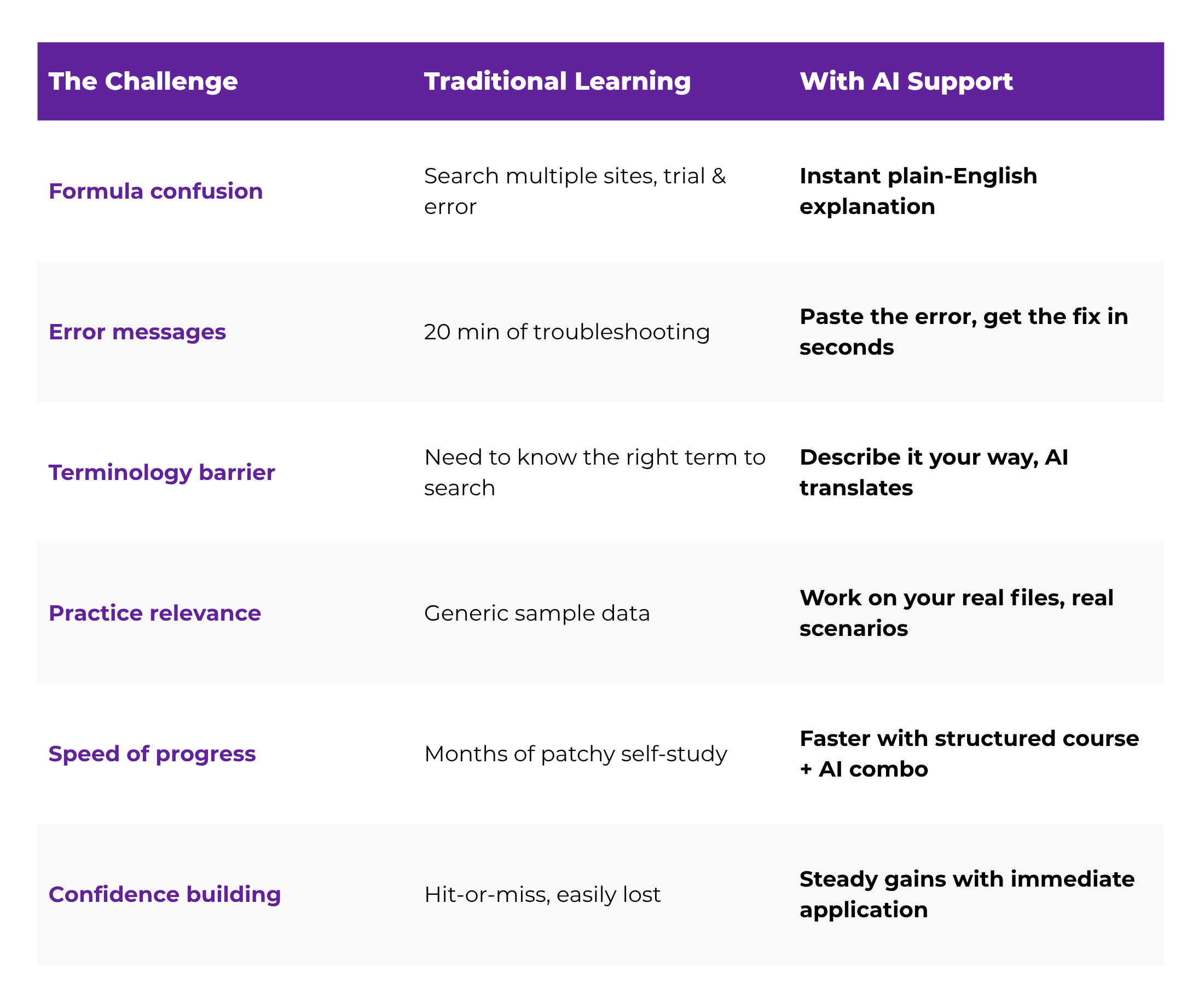
AI changes the dynamic entirely. Instead of learning in the abstract, you can now get instant, context-specific help at the exact moment you need it. It's like having a patient tutor on call — one who never judges your question and never makes you feel behind.
One of the biggest barriers to learning Excel has always been not knowing the right terminology. With tools like ChatGPT or Microsoft Copilot, you can describe what you're trying to do in plain English and get a working formula or step-by-step solution.
Instead of searching "how do I calculate percentage difference in Excel" and wading through 15 articles, you type your question, get a direct answer, and apply it immediately. That's not cheating — that's working smarter.
Formulas like IF, SUMIF, or VLOOKUP used to be intimidating — mostly because no one explained what each part actually does in simple terms. AI can walk you through every element of a formula and explain it the way a patient teacher would, not a textbook.
This is a game-changer for visual learners and people who need to understand why before they can apply how. You can literally paste a formula you found online and ask AI: "What does each part of this do?" — and get a clear, jargon-free breakdown.
Getting a #VALUE! or #REF! error in Excel used to mean 20 minutes of Googling and growing frustration. Now you can paste your formula into an AI tool, describe the error, and get a clear explanation of what went wrong — usually in seconds.
"AI doesn't just give you the answer — it helps you understand why something works. That's where real confidence comes from."
Microsoft 365's built-in Copilot feature can help you generate templates, auto-fill data patterns, create charts, and summarize spreadsheets — even before you've mastered every feature yourself. This means you can produce professional-quality work while you're still learning.
The result? You stay productive at work while you're building skills behind the scenes. No one needs to know you're still figuring it out — and the output speaks for itself.
Unlike generic tutorials, AI lets you practice on real scenarios from your actual job. You can describe your spreadsheet and ask for suggestions specific to your industry, your data layout, or your reporting needs. The learning sticks because it's immediately useful — not hypothetical.
You don't need to overhaul your workflow or commit to a 12-week course before you start seeing results. Here's a practical starting sequence that any professional can use immediately:
Don't practice on made-up data. Start with something you actually use — a budget tracker, a timesheet, a client list. Real context speeds up learning dramatically because you immediately see the value in what you're doing.
✓ Pro tip: Save a copy first so you can experiment safely
Maybe you want to total a column, calculate a percentage, sort data alphabetically, or flag cells above a threshold. Pick one specific thing you want to accomplish — not five. Focus beats breadth every time.
Type your question into ChatGPT, Microsoft Copilot, or another AI assistant. Describe what you have and what you want to happen. Get a step-by-step response tailored to your situation — no jargon required.
✓ Example: "I have a column of sales numbers. How do I add them up in Excel?"
Don't just copy the formula — understand it. Ask the AI to break down what each part does. This is how you build real, transferable knowledge rather than a collection of shortcuts you can't replicate.
AI is a great supplement, but pairing it with a structured course ensures you build a complete, confident skill set — not just a patchwork of fixes. Structure gives you the full picture; AI fills it in as you go.
✓ WBTS Excel course designed specifically for this progression
AI is a powerful accelerator, but it works best when you have a foundation to build on. Without structure, it's easy to pick up fragmented knowledge — knowing how to do one thing here, another thing there — without understanding how it all fits together.
That's where a thoughtfully designed course makes the difference. A good Excel course gives you a progression: from understanding the interface, to building formulas, to organizing data, to creating meaningful reports. AI fills in the gaps along the way and helps you apply each skill faster.
Think of it like this: AI is your on-call tutor. A structured course is your curriculum. You need both to go from beginner to capable — and from capable to confident.
Look for courses that are paced for working professionals, focus on real workplace scenarios (not just academic examples), and build skills in a logical sequence. Bonus points if they include practice files you can use on your own data.
The Mastering Microsoft Excel course at WBTS is designed specifically for professionals who didn't grow up with spreadsheets. It moves at a pace that builds real confidence, covers the tools most relevant to actual workplace needs, and helps you apply what you're learning immediately — not someday.
Explore the course →
One of the most common things Kristin hears from professionals in their 40s and 50s is some version of: "I wish I had learned this sooner." But the truth is, the tools available today — including AI — make it a genuinely better time to learn Excel than ever before.
The learning curve is less steep. The support is more responsive. And the payoff — in terms of workplace confidence, efficiency, and career positioning — is just as real.
You don't need to become an Excel expert overnight. You just need to start, stay consistent, and use every tool available to you — including AI — to build something real.
Your skills are an investment in your future. And that future is closer than you think.
The WBTS Mastering Microsoft Excel course was built for professionals who want real, applicable spreadsheet skills — with guided instruction designed for how adults actually learn. Join 700+ professionals who've already made the shift.




 Apply it, then ask AI to explain why it works
 Layer in structured learning to fill the gaps